The verified pack loop in [🃏] Anime Card Collection is simple: purchase card packs from the conveyor belt, unlock a pack, let its card enter the Binder automatically, and use money generated by cards to buy better packs. That sequence comes directly from the Peak Anime experience description. It does not publish a complete pack list, prices, drop odds, unlock conditions, or a guaranteed order.
Use this index to recognize the pack presentations shown in official media and to compare the fields that appear in your current server. The visual records below are descriptions, not unofficial pack names. Keep the exact in-game label when one becomes readable.
Currently documented pack visuals
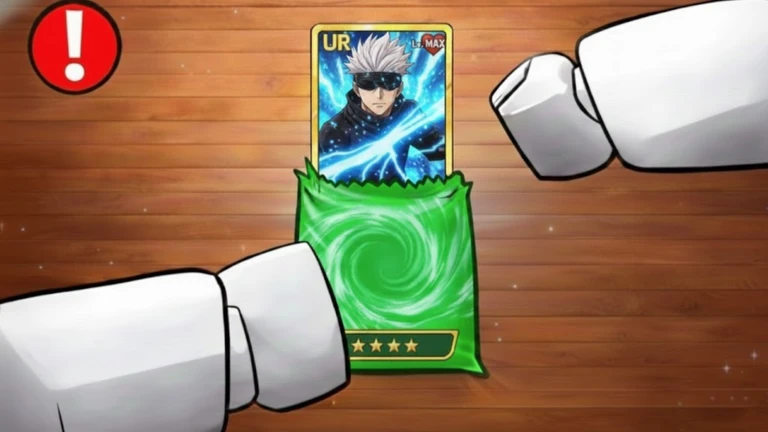
Green foil pack appearance
Visible result: a UR-labeled card and a star row.
Official pack name: not shown.
Price, currency, odds, and pool: not published.
Official media · visual record only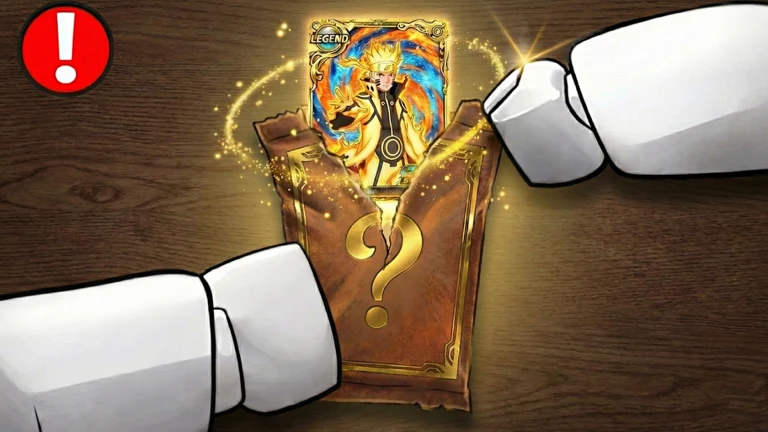
Brown question-mark pack appearance
Visible result: a LEGEND-labeled card.
Official pack name: not shown.
Price, currency, odds, and pool: not published.
Official media · visual record onlyThese two visuals do not prove that the game has only two packs, that the colors identify fixed tiers, or that the pictured results are guaranteed. They show that the exact experience has been promoted with pack-opening presentations and at least the visible UR and LEGEND labels.
Buy a pack without losing track of the result
Enter the exact Peak Anime experience and find the conveyor-belt purchase area described on the Roblox page. The precise spawn route, belt direction, and interaction prompt still need a live server, so follow the labels you can see rather than a route copied from another game.
Before buying, read the visible pack name, price, and currency. Note your balance. Buy a single pack, wait for the opening to complete, and record the card result before starting another purchase. Then open the Binder and confirm that the card was collected. This one-at-a-time loop makes it possible to connect a result with the pack that produced it.
If multiple packs are passing on the conveyor, do not assume screen position is a permanent progression order. Record the current sequence and the time you observed it. A belt can represent availability, presentation, or progression, but the public description does not explain its refresh rule.
Compare packs with a useful index
For each pack that has a readable in-game label, keep these fields together:
- Display name: the exact label shown at purchase or opening.
- Price and currency: both are necessary; a number without its currency is ambiguous.
- Conveyor availability: where and when it appeared in your server.
- Unlock condition: include it only when the interface states one.
- Open time: measure from confirmed purchase to completed reveal if timing matters.
- Cards per opening: count the actual revealed cards; do not infer from artwork.
- Visible pool or odds: copy only values shown by the current interface.
- Result: card display name, rarity text, and stars when readable.
- Checked version or date: enough context to identify later changes.
- Evidence status: live observation, official media, or not confirmed.
This layout covers pack list, pack order, pack prices, and pack contents without splitting them into thin pages. Unknown fields should stay empty. A short reliable record is more useful than a polished table filled with values from the wrong experience.
Decide whether to save or open another pack
The official loop encourages buying better packs as card income grows, but it does not define “better” with a public price or odds table. Use the choices shown in your server. Compare the next pack’s visible cost with your current balance and the specific collection or income improvement you want.
If your goal is collection completion, a pack is useful when the current game indicates that it can fill a missing Binder slot. If your goal is income, compare the cost with the verified earnings of your current collection and the result you actually receive. The Card Income guide gives a neutral way to measure the change without promising a fixed payback time.
Avoid spending based only on the word “better.” It may describe later progression, a higher purchase price, a different card pool, or a more valuable expected result, but the official description does not define which. Buy one, confirm the result and save state, then decide whether another attempt answers the same goal.
Connect a pack result to the Binder
Cards are supposed to enter the Binder automatically. After the reveal, find the corresponding card in Cards using the exact display name and visible fields. Then check the Binder hub for the collection slot and overall income context.
If the new card is not easy to find, do not immediately purchase again. Check whether the opening animation completed, whether the Binder view has multiple pages, and whether the result was a duplicate. Page order, filters, duplicate behavior, and capacity are not publicly documented for this Place, so the live interface must decide the next step.
When a duplicate appears, record what the game visibly does—adds another copy, upgrades a card, converts it, or simply keeps the slot unchanged. Do not assume any of those outcomes from genre conventions or from Crew Simulators’ same-name experience.
Keep pack order and price claims current
A pack list can change after a game update. Date every observation and use the exact Place ID. If prices differ between servers, record both server times and look for a creator announcement before calling either value incorrect. Do not combine screenshots from separate updates into a single “current” order.
The Roblox Games API exposes an updated timestamp for the universe, but that timestamp does not say which pack changed. Use the Updates hub to understand the difference between platform metadata and a real patch note. A pack field should change here only when the current interface or a creator-owned announcement supports the new value.
Avoid wrong-game pack data
The other Anime Card Collection, Place 76285745979410, dominates many search results. Public pages for that experience may list dozens of packs, detailed odds, grading, mutations, trading, merchants, towers, or raids. None of those details can be transferred to Peak Anime’s Place 81089945895600.
Check the Roblox destination behind every guide. If the creator is not Peak Anime or the Place ID differs, use it only for that other product. Even when a pack image looks similar, names, pools, costs, and odds require an exact target match.
Pack problems and recovery
If the purchase prompt is unavailable, make sure you are beside the correct conveyor item and that the current server is running normally. If the experience page says there are no running experiences, wait for an official server to become available rather than following an unrelated game’s route.
If your balance changed but no reveal completed, pause before buying again. Capture the visible state, check the Binder for a new entry, and rejoin only after you have enough information to tell whether the transaction saved. Roblox connectivity or a game update can interrupt presentation, but no exact refund or retry rule is documented.
If a listed price or result disagrees with your screen, trust the current exact-Place interface for your decision and note the date. A stale screenshot should not override a live label.
Packs FAQ
How many packs are in Anime Card Collection?
No complete count is verified for the Peak Anime experience. Official media shows at least two different pack appearances, but visual variety is not a full pack inventory.
What is the pack order?
The official description confirms conveyor-belt purchasing and progression toward better packs. It does not publish names, a fixed sequence, or unlock requirements.
What are the pack prices and odds?
No exact price or odds table is available from the target’s public first-party sources. Read the current in-game labels and keep the currency attached to every price.
Does every opened card go to the Binder?
The official description says cards are collected in the Binder automatically. Duplicate behavior, refresh timing, and interrupted-opening recovery still need live testing.
Where should I continue?
Open Cards to compare the result, Binder to track collection state, or the Beginner Guide for the full first-session loop.