The Binder is where the collection loop becomes visible. Peak Anime’s official description says cards enter the Binder automatically after they are opened and that cards generate money. Official media shows an open Binder with multiple card slots, one question-mark slot, and a large income-per-second display. That confirms the Binder’s collection and income themes without establishing the complete page count, card roster, duplicate rules, or exact controls.
Use the Binder as your record of what the game saved, not as a reason to invent missing entries. After each pack, locate the new card, copy its displayed fields, and compare the collection and income state before buying again.
What the official Binder image shows
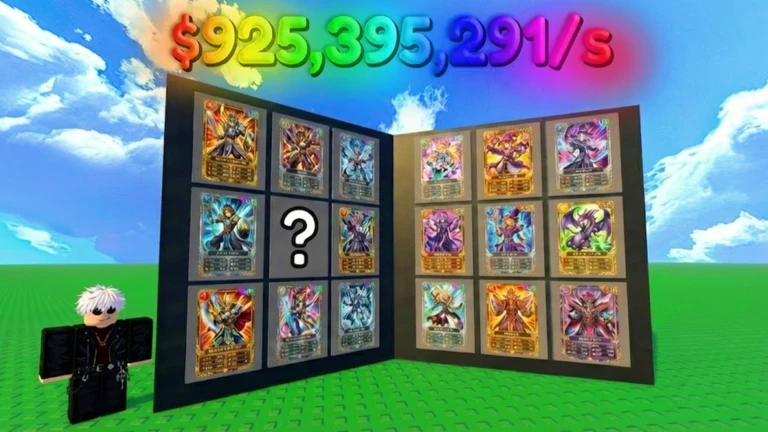
Collection spread
Multiple framed cards appear across two open pages. The presentation supports a slot-based collection view.
One slot uses a question mark, which visually represents a missing or hidden entry. Its exact requirement is not disclosed.
Official media · checked 2026-09-07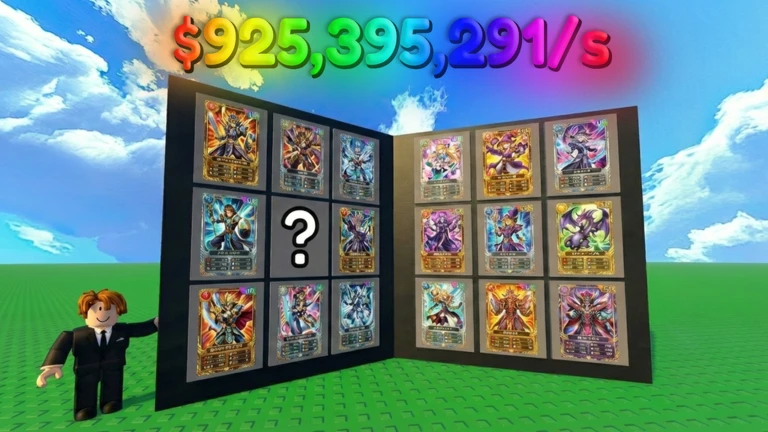
Income presentation
A large currency figure followed by `/s` appears above the Binder. It demonstrates a per-second display in promotional media.
The pictured total is not a promised starting rate, reward, or current maximum.
Official media · presentation, not a guaranteed valueCheck that a newly opened card was saved
Before purchasing, look at the relevant Binder page or at least note your visible collection state. Open one pack and wait for its reveal to finish. The official description says the card should be collected automatically, so your next task is confirmation rather than a separate manual “add” action.
Open the Binder through the control shown in your current server. Find the revealed card by its exact display name, art, rarity label, and star row. If the name is not readable during the reveal, compare multiple fields instead of identifying it from artwork alone. Record the pack only when the result screen or purchase label makes that connection clear.
If you cannot find the card, check nearby pages and confirm the opening completed. The public sources do not document Binder sorting, page navigation, filters, or refresh timing. Do not buy another pack until you know whether the first result was stored, because a second reveal makes troubleshooting harder.
Track missing cards without a guessed roster
A good collection tracker begins with what your Binder actually shows. Number pages or slots only when the interface displays a stable order. For each visible entry, keep the exact name, rarity text, stars, displayed income, pack source if known, and the date. For an unknown slot, record its position and visible hint without assigning a character or pack.
Collected entry
Use the live display name and visible fields. Add a screenshot reference only for your own comparison.
Missing entry
Keep the slot position and any in-game hint. Leave name, rarity, income, and source unset until shown.
Unclear entry
Mark it as not checked when text is cropped, translated differently, or hidden behind another panel.
Do not call your tracker “complete” until every live page and slot has been checked in the same version. Promotional Binder images can show representative cards without proving the final roster. The Cards Dex keeps official visual records separate from current in-game observations.
Separate card income from the Binder total
The official description confirms that cards generate money, and the official Binder image presents a large /s total. It does not explain whether that total is the sum of every collected card, a displayed rate after modifiers, or a promotional setup. Read the label in your own server before assigning the number to a rule.
When the Binder shows individual card values, record them separately from the overall total. Then collect or open one card and compare the same fields again. A clean before-and-after observation is more useful than dividing a promotional total by the visible number of cards.
Use the Card Income Guide for a timed measurement, reinvestment comparison, and checks for idle or offline claims. It deliberately avoids fixed rates because card values, bonuses, and server behavior have not been published for this exact Place.
Decide what to chase next
Choose one goal before returning to the conveyor. For collection progress, target a pack only when the game gives you evidence that it can fill a missing slot. For income progress, compare the visible cost of a pack with the income change you can verify. For visual collecting, keep the card you want separate from assumptions about its economic value.
The official loop says to buy better packs as cards generate more money, but “better” is not publicly defined. It may be represented by price, availability, pool, or another label in the current interface. The Packs index shows how to record these fields without inventing pack names or odds.
Avoid opening many packs before reviewing the Binder. A short cycle—purchase, reveal, locate, compare, decide—keeps your collection state understandable. It also helps you identify a duplicate or a save delay before additional results cover the evidence.
Handle duplicates carefully
No exact-target public source explains what happens when you open a card already in the Binder. Do not assume duplicates stack, merge, level up, convert to money, disappear, or increase income. Those are different mechanics and each needs a visible result.
When a repeated card appears, record the Binder entry and income before and after the opening. Look for a quantity, star change, animation, conversion message, or total-income change. If nothing visibly changes, leave the duplicate outcome unresolved instead of choosing an explanation.
This is especially important when reading same-name guides. Grading, mutations, marketplace values, relics, or trade systems described for Crew Simulators’ Place 76285745979410 are not evidence for Peak Anime’s Place 81089945895600.
Keep collection records useful after updates
Add a checked date and the exact Place ID to every session record. If the Binder changes after a Roblox update, compare the page count, displayed labels, and values before replacing older notes. A platform updated timestamp does not identify the changed card or mechanic, so pair it with what you can actually see.
Preserve old values as dated observations rather than silently editing them into current facts. That makes a price or income change easy to recognize and prevents mixed-version totals. The Updates hub lists only official metadata and clearly sourced status events.
Binder problems and recovery
If a card reveal completes but no Binder entry is visible, stop opening packs. Check the exact card name, nearby pages, and whether the server shows a save or connection warning. Rejoin only after noting the current balance and result. There is no verified refund, save-delay, or duplicate-conversion rule for this experience.
If your total income changes but you cannot find a new card, compare the same screen and unit as before. A temporary animation, ordinary income tick, or another modifier could make a quick glance misleading. Use a longer clean interval in the income guide.
If the Binder layout differs from the official image, trust the current exact-Place interface. Official media documents the experience’s presentation, but it does not guarantee that every menu remains unchanged.
Binder FAQ
Do cards enter the Binder automatically?
Yes. The official Roblox description explicitly says cards are collected in the Binder automatically after opening.
Is there a complete collection tracker?
No complete live roster is verified for Place 81089945895600. Build a personal tracker from the current Binder and leave unsupported fields unset.
What does the large /s number mean?
Official media shows a large per-second money presentation above a Binder. The exact formula, included cards, modifiers, and current attainability are not published.
What happens to duplicate cards?
Duplicate handling is not documented by the exact target’s public sources. Observe the live Binder, income, and any result message before assigning an outcome.
Can I track missing slots by neighboring cards?
You can record the visible position, but do not infer the hidden card’s name or pack solely from its neighbors. Use an explicit in-game hint or a verified reveal.
Official references
Recommended guides
Choose the guide that matches what you want to do next.
All Binder guides
1 focused guides with steps, checks, and current caveats.